macOS Obsidian の “is not a git command” エラー
結果、ドキュメントの記載通りですが、意外と辿り着けなかったのでメモ。
事象
macOS の Obsidianに Community Plugin の Gitプラグインを導入。

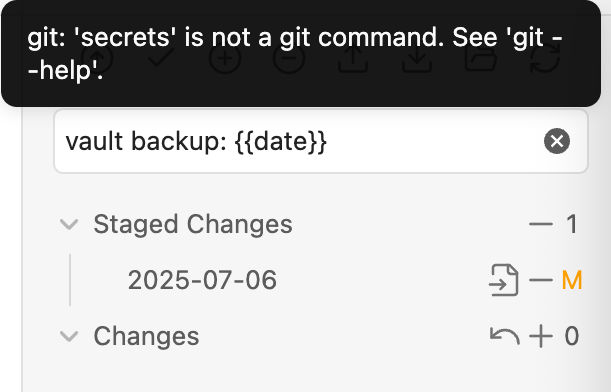
commit を実行しようとすると以下のエラー。
git: 'secrets' is not a git command. See 'git --help'.
結論
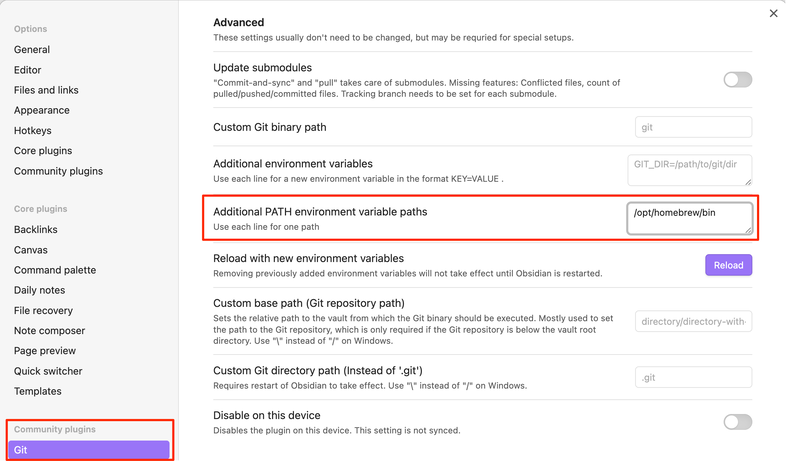
PATH を通しましょう。
ドキュメントにも記載があります。Integration with other tools
他のインストール可能なツールの統合に関するほとんどの問題は、そのインストールパスがPATH環境変数に追加されていないことである。
環境とか
git と git-secrets が Homebrew により導入済みの環境。
Terminal からはエラー無く利用可能な状態。
~ % git --version
git version 2.41.0
~ % git secrets | head -n 1
usage: git secrets --scan [-r|--recursive] [--cached] [--no-index] [--untracked] [<files>...]
~ %
~ % which git
/opt/homebrew/bin/git
~ % which git-secrets
/opt/homebrew/bin/git-secrets
~ %
今回 git は利用できつつ、 git-secrets が見つからないエラーであったため少々混乱しました。
Obsidian からは、macOS にバンドルされている /usr/bin/git が使われ、その際に pre-commit が発動、実行時に secrets が見つからない挙動になっていたというオチでした。
